Bookmark and Share
Delecious Orkut face book twitter yahoo Linkedin You tube Blog_icon
AVI Infosys
AVI Infosys AVI Infosys
iguard access control uae
  Certifications Awards Advertisements Our Clients Our Partners Blog Corporate Videos Photo gallery
AVI Infosys AVI Infosys
 
AVI Infosys AVI Infosys
 
Icon Biometric / Smartcard based Authentication Solutions
 
  AVI Infosys iGuard Technology Overview AVI Infosys
AVI Infosys AVI Infosys
 
See the Web Server in Action
Each iGuard Biometric / Smart Card Security Appliance has a built-in Web Server enables all the computers in the corporate network to directly simultaneously access the device using any Internet Browser, such as Microsoft Internet Explorer Netscape Navigator. Different computer platforms such as Apple Macintosh, Microsoft Windows Linux machines can access the device. No additional software is required. So whether you are in an airport lounge or a hotel room, you can always check if your employees are already in the office or not, and you can even control, modify or disable their access rights to your office remotely via internet connection provided your iGuard Biometric / Smart Card Security Appliance is connected to an external IP address or your network is available through a VPN connection that is reachable from your location.

iguard iguard
iguard
iguard iguard iguard iguard iguard
Network up to 255 Total Devices Across a Single Domain
> Free Consultation
  • iGuard Features
  • Access Rights
  • Economical
  • Small footprint
  • Simplycity
  • With iGuard, users can be authenticated and verified through either Fingerprint,Smartcard or Password. And depending on the different time period, you can set up the iGuard that the users can just simply presents his smartcard to get authorized (such as during high-traffic period), or requires the high-security fingerprint verification (such as after office hours or during weekends and holidays).
  • When you can easily and conveniently assign different access rights to your employees, you can plan your security better and maximize the effectiveness of the human resources . And with the built-in Web Server technology, iGuard empowers you to manage the access rights of each individual employees or a group of employees easily anytime, anywhere using any web-enabled computers or mobile devices. For example, you can assign the staff members of the marketing department the rights to get in the office premises during weekdays from nine to five only, or prevent a particular employee from entering the computer server room. Reports: iGuard includes three built-in reports: sAccess Log, Attendance Report & Daily In/Out report, that can be accessed via any web-enabled computer with web browser. Should more sophisticated reports be required, such as for the payroll purposes, the information can be downloaded and saved in Microsoft Excel format and in plain text format. In addition, the access records can be saved in any PC in the network in the popular ODBC database format in real-time manner, and other applications can conveniently obtain the information from the ODBC (the required software, iServer is available free-of-charge in our download page)
  • ll the necessary hardware and software is built-in to the device, including the hardware to connect the system to the corporate network. All you need to do is to plug-in the popular RJ-45 network cable to the back of the device. No other hardware and wiring is necessary. In contrast, all other existing security systems use the old RS232 & RS485 wiring system to connect to the dedicated computers (not to the corporate network), and it usually involves a lot of extra wiring works.
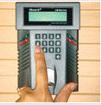
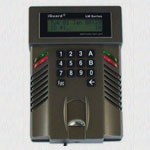
  • iGuard is a wall-mounted unit elegantly designed with extremely small footprint. In fact, it is the smallest stand-alone biometrics device available in the market today. It can be mounted easily and conveniently without requiring a lot of space.
  • iGuard is an Internet-Ready Security System, and is the first and the only network appliance security product in the market that uses TCP/IP as the protocol to communicate with other iGuards and the outside world. The protocol enables the device to directly connect to the corporate network via the existing cable wiring. And since the TCP/IP protocol is the Internet protocol, it allows all computers in the corporate network to access the device using the Internet Browser software. As a result, users do not need to learn to use a new software to access and administer the device, and most users can start using the device in minutes. In contrast, all other similar security systems use proprietary protocol & wiring, and proprietary software is required to access these systems. And for compatibility purposes, iGuard also supports conventional interfaces including Wiegand, RS-485 & RS-232.
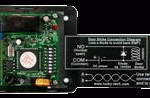
  • The IG-ER-01 Secure Strike Relay controller further increases the security level by controlling the door strike from inside of the premises. With this optional controller, the iGuard sends a special signal to this controller to open the door, rather than directly open the door with the internal relay. Because this optional controller is installed inside the premises, it is now impossible for the intruders to get into the premises, even if they destroy the iGuard.
 
 
AVI Infosys AVI Infosys
 
  AVI Infosys Access Control System AVI Infosys
AVI Infosys AVI Infosys
  iguard  
AVI Infosys AVI Infosys
 
  AVI Infosys How it works as an Access Control System AVI Infosys
AVI Infosys AVI Infosys
 
iGuard analyzes & compares a persons fingerprint against the previously enrolled record. If the two fingerprints match, the person is authenticated. And if the time is within the authorized period for entry, the device will signal release the electric door lock.
 
iguard
The iGuard Security System analyzes and compares a persons fingerprint against the previously enrolled record. If the two fingerprints match, the person is authenticated. And if the time is within the authorized period for entry, the device will signal and release the electric door lock.
 
  • Access Time restriction - you can define the authorized time for each individual or for a group of individuals.
  • Terminal restriction - you can specify who has the rights to access a particular terminal. It is useful in a multi-device environment, where multiple doors are controlled by different devices.
  • Password/Fingerprint Access - you can define the period in which password can be used instead of fingerprint for access. This is particularly useful if you want to just use password to access during normal office hours, but to restrict the access to authorized people only after office hours.
 
The Access Control Mode controls the employees from entering the business premises. The system controls the electronic door strike to lock / unlock the door. Users can be assigned to different departments and the authorized time for members in each department can also be controlled. In a multi-device environment, the access rights for each department in accessing different terminals can also be assigned.
iguard
 
AVI Infosys AVI Infosys
 
  AVI Infosys How it works - as a Time Attendance System AVI Infosys
AVI Infosys AVI Infosys
 
When configured as a Time Attendance System, a user can specify whether he/she is clocking-in or clocking-out. By using fingerprints to determine identity, buddy-punching problems can be totally eliminated as well as other fraud. Attendance of each employee is printed on the attendance report. The attendance report is particularly useful for payroll purposes. Wages and salaries can be paid according to the employees worked hours, overtime etc. Wages and salaries can be integrated with a smart card or automatic deposit payroll system.
iguard
 
AVI Infosys AVI Infosys
 
  AVI Infosys Techenical Specification: AVI Infosys
AVI Infosys AVI Infosys
 
SC / FSC / FOSC SuperMaster
Power 12VDC, 600mA 12VDC, 800mA
Fingerprint Sensor n/a / Capacitive / Optical n/a
Contactless Smart Card reader writer (built-in) Yes n/a
Web and Database Server Built-in
Network Security (SSL) Optional
Auto Data Synchronization (i.e.,master / slave configuration) Yes
Maximum Transaction Records stored 10,000 20,000
Static / Dynamic IP Assignment Yes(Support existing DHCP Server)
Non-volatile memory 16MB 32MB
Computer Supported (with Internet Browser) Macintosh,Windows 95/98/NT/ME/XP, Linux and Unix Machine
Valid Characters for Employee ID 0-9, A-B(maximum - 10 characters)
Display 16 x 2 LCD with Backlight 16 x 2 LCD with Backlight
LCD Multi-Lingual Yes Yes
Two Finger Enrollment Yes
Fingerprint Sensor Type n/a / Capacitive / Optical n/a
Fingerprint Sensor Resolution 500dpi n/a
Fingerprint Sensor scan area (mm) 12 x 15 n/a
Image Capture Time < 1 sec. n/a
Verification Time < 1 sec. n/a
False Rejection Rate < 1 % n/a
False Acceptance Rate < 0.01% n/a
Auto-match Count 30 n/a
Network Protocol TCP/IP, HTTP
Network Interface Ethernet (10-Base T) Ethernet (100-Base T)
Other Interface Wiegand (Output Only)
Real Time Clock Last for approx. 2 days without power
External Controls Door Strike
Open-Door
Switch
Break-in Alarm
Door Status
n/a
Dimension (mm) SC/FSC : 105(W) x 38(D) x 150(H)
FOSC : 105(W) x 55(D) x 150(H)
254(W) x 193(D) x 61(H)
Certification
AVI Infosys  AVI Infosys
Pending
 
AVI Infosys AVI Infosys
 
  AVI Infosys Door Locks and fixtures for installing Access Control and Time Attendance devices AVI Infosys
AVI Infosys AVI Infosys
 
WOODEN DOORS
 
Lock Electromagnetic Lock unit with external relay circuit and LED
Lk-Brt-w Door Lock Bracket with rubber base – for wooden doors
Pw-Spp Regulator Power Supply 12 V with Heavy Duty Power Cable
Cables Cables & Accessories with one release button from inside door
 
GLASS DOORS
 
Lock Electromagnetic Lock unit with external relay circuit and LED
Lk-Brt-w Door Lock Bracket with rubber base – for glass doors
Pw-Spp Regulator Power Supply 12 V with Heavy Duty Power Cable
Cables Cables & Accessories with one release button from inside door
 
AVI Infosys AVI Infosys
 
  AVI Infosys Door Locks and fixtures for installing Access Control and Time Attendance devices AVI Infosys
AVI Infosys AVI Infosys
 
PRODUCTS Detailed Description
Daugher Board (SC Model)
Daughter Board (SC Models)

"Replacement Daughter Board (FSC Models)Item Number: LM520-FP-RD

Daughter Board with Sensor; includes LCD & Casing"

Daughter Board without Sensor
Regulator Power Supply 12 V with Heavy Duty Power Cable
Casing with Shutter & Spring
Cables & Accessories with one release button from inside door
 
AVI Infosys AVI Infosys
 
  AVI Infosys Accessories Section: AVI Infosys
AVI Infosys AVI Infosys
 
SC = SmartCard Only iGuard

FSC = Fingerprint and Smartcard iGuard

FOSC = Fingerprint Optical Sensor and SmartCard iGuard

iGuard Power and Strike Units
iGuard Network Appliance
Power Options
Overview
The AL400ULX power supply converts a 115VAC / 60Hz input, to a 4 amp of continuous supply current @ 12VDC or 3 amp of continuous supply current at 24VDC power limited output, (see specifications).
Specifications: Agency Listing
  • UL Listed for Access Control Systems (UL294), Burglar Alarm Systems (UL603),
    Hospital Signaling and Nurse Call Equipment (UL1069),
    Power Supply for Fire Protective Signaling and Systems (UL1481)
    CUL Listed - CSA Standard C22.2 No.205-M1983,
    Signal Equipment File # S4707.
  • CSFM - California State Fire Marshal Approved.
    File # 7315-1335:100. MEA - NYC Department of Buildings Approved.
    File # 120-93-E.
  • FM approved.
  • NFPA 72 compliant.
Input:
  • 15VAC / 60Hz, 1.45 amp. • AC input and DC output LED indicators.
Output:
  • Class 2 rated power limited output. • 12VDC or 24VDC selectable output.}
  • 4 amp continuous supply current @ 12VDC or 3 amp continuous supply current at 24VDC.
  • Filtered and electronically regulated output. • Short circuit and thermal overload protection.
iguard
Battery Backup:
  • Built-in charger for sealed lead acid or gel type batteries.
  • Automatic switch over to stand-by battery when AC fails.
  • Maximum charge current .7 amp.
  • Zero voltage drop when switched over to battery backup.
Supervision:
  • AC fail supervision (form "C" contacts).
  • Low battery supervision (form "C" contacts).
  • Battery presence supervision (form "C" contacts).
Additional Features:
  • Power supply, enclosure, cam lock and battery leads.
  • All models are available in red enclosure (add an "R" suffix to the part # e.g. AL400ULXR). Enclosure Dimensions: 13”H x 13.5”W x 3.25”D
Electric Door Strikes for Wood Doors SD-994C

Fail-secure or Fail-safe: 12VDC

Electric Door Strikes for Metal Doors SD-995C

Fail-secure or Fail-safe: 12VDC
iguard
  • Field-programmable in just seconds for fail-secure or fail-safe applications.
  • The ENFORCER Electric Door Strikes convert cylindrical lock sets to an electronic access controlled locking system.
  • Can be used on virtually any cylindrical door locking system.
  • Suitable for office-type applications.
  • 7-15/16" x 1-7/16" x 1-1/4” (202 x 36 x 32mm) Symmetrical-sized.
  • Reversible for right-hand or left-hand doors.
  • Shallow design for use with most wood doors.
  • Powered by a solenoid, not a buzzer coil.
  • Jaw strength 2, 000 pounds.
  • Stainless steel lip (keeper) for strength and long life.
  • Non-polarized connection.
  • Wires can be reversed.
  • SD-994C: Current draw 250mA @ 12VDC.
  • Tested to 1 million cycles.
  • Optional lip-extension bracket available
  • CE approved.
 
AVI Infosys AVI Infosys
 
  AVI Infosys LAN/WAN Network Configuration AVI Infosys
AVI Infosys AVI Infosys
 
LAN Network
 
A typical network diagram showing multiple iGuard Systems connected through a corporate network. Each iGuard is assigned its own specific IP address. These systems can be set up in a master / slave configuration so that biometric template data is replicated automatically throughout the network on each iGuard. Optionally, the template matching can be performed on a secure server at a single point on the network. For this type of environment, the Client/Server iGuard is necessary.
iguard
 
WAN Network
 
This diagram shows multiple iGuard units connected through the Internet or over a WAN. This environment requires the master/slave configuration for template matching because of the latency on the network when retrieving templates and matching them to a central database over the WAN.
iguard
 
AVI Infosys AVI Infosys
> Free Consultation
Go to Top
 
AVI Infosys AVI Infosys